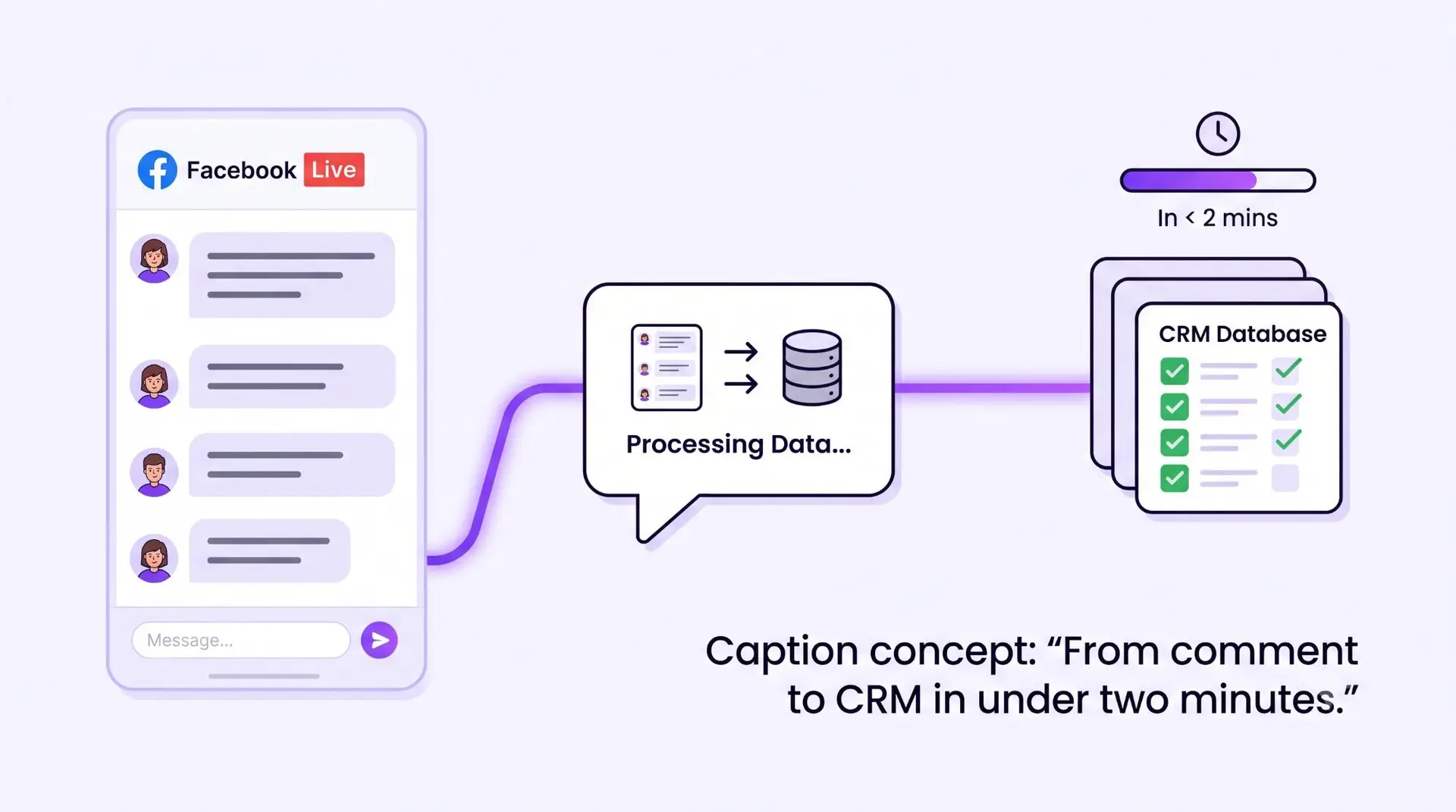
Image this scenario as a business owner:
- A Friday 8pm FB live for promoting your new launch product / services
- Total 100 people watching
- 40 people comment “price?”, “interested”, “PM”
After the live ended, you or your customer service will have to manual pm those leads, sending the product info, price & packages and record the leads in CRM. But at that time, maybe half of them already placed order with your competitors at Shopee or Lazada.
This is not just a staffing problem, is about timing which customers’ purchasing urge may be gone when you ready to pm them. And this is exactly what an AI Customer Service that lives inside your FB page or WhatsApp is trained to close.
This blog will walk through the exact workflow from how a comment on a FB live becomes tagged and ready to shipped lead in your customer database without any manual entry.
The Automated Funnel: From FB Live Comment to Tagged Lead
Here is the same scenario, run through an AI Customer Service instead of a human data-entry chain.
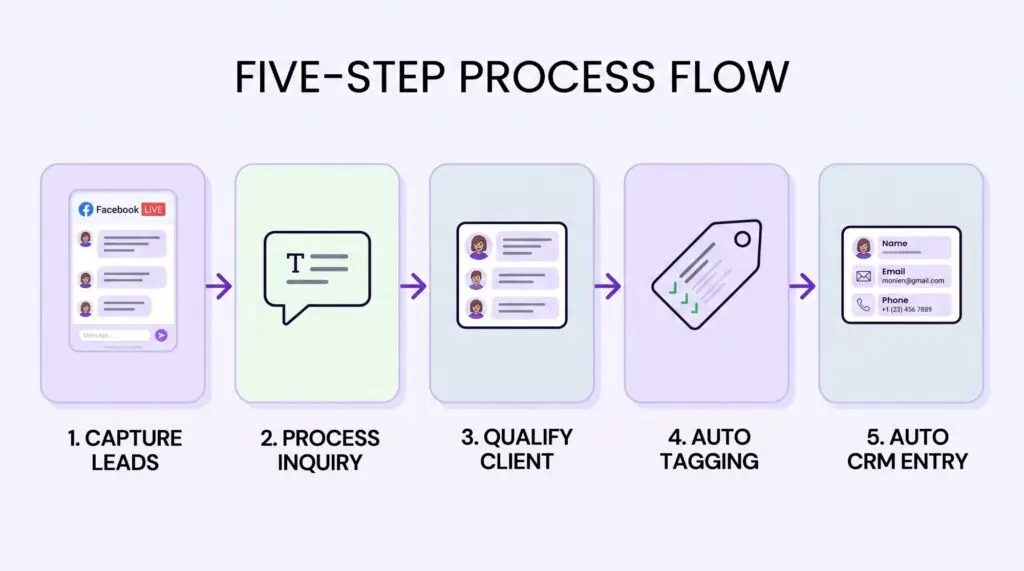
Step 1: FB Live Engagement is monitored in real time
The AI Customer Service is connected directly to your Facebook Page. It watches comments on a Live video the moment they’re posted, no one has to be staring at the screen refreshing the comment feed.
Step 2: AI instantly messages the commenter
The moment someone comments “price?” or “interested,” the AI opens a private message to that person. This happens in seconds, not after the broadcast ends. Thus we can tell AI to PM certain keywords (PM, price, how much & etc) or just capture all comments.
Step 3: AI collects contact details inside the same conversation
Instead of a generic “thanks for your interest, we’ll contact you soon,” the AI asks the questions your sales team actually needs, usually an email or phone number, plus one qualifying question like preferred branch or product interest. This is the Customer Information Collection step, and because it happens inside the chat the customer already opened, response rates run far higher than a next day follow-up.
Step 4: Auto tag/category is applied based on the answer
Based on how the customer responds, the AI analyzes and adds a tag automatically for example: “High Interest,” “Price Enquiry Only,” “Existing Customer” or whatever categories match your sales process. No staff member has to manual scroll through the chats and apply tags.
Step 5: The customer database auto-updates
The tagged lead, along with their contact details and the source (“FB Live – 25 July”), writes directly into your customer database (in Google Sheet / HubSpot / Zoho & etc. There is no export, no copy & paste, no second system to update by hand.
What the AI Customer Service Handles After the Funnel
Getting a lead tagged and stored into your CRM/database is only the first half of the job. What happens in the hours and days after that is where most manual systems quietly fall apart. This is because by the time a staff member gets around to the follow-up, the customer has already moved on. Here’s what the same AI Customer Service keeps handling, automatically, once the lead is in the system.
Branch / Agent Assignment
If a customer mentions a specific outlet, or their enquiry falls into a specific product category, the AI routes the conversation to that branch or agent automatically. As well as the CRM record, AI can also update the contact owner / preferred branch of that customer. For a business with multiple outlets, this removes an entire layer of manual triage that used to fall on a receptionist or admin staff member.
Auto Quotation
Once a lead is tagged “High Interest” with a known product or service category, the AI can trigger a pre-approved quotation template automatically which filled in with that customer’s details and sent within minutes, not the next business day.
Auto Follow-Up
When a quotation is sent doesn’t mean that customer read or go through it and it’s definitely not a sale closed. Instead of relying on a staff member to remember which customers went quiet after a quote, the AI follow up on its own, referencing what was actually discussed earlier in the chat rather than sending a generic “just checking in/just following up”.
A customer who asked about pricing for a specific package gets a follow-up about that package; someone who mentioned a timeline gets a nudge closer to that date. This keeps the conversation warm without anyone having to scroll back through chat history to remember where things were left off.
Appointment Reminders
Once a booking is confirmed, the AI handles reminders on a schedule you set a day before, an hour before, or both. Reminders can actually cut down no-shows without anyone having to manually message every customer scheduled on the day.
Collect Service / Product Feedback
After the appointment or delivery, the same AI Employee can follow up to collect feedback, logging the response against that customer’s record. Over time, this becomes a genuine feedback loop instead of an occasional WhatsApp message someone remembers to send.
None of this requires the business owner to write code, manage a server, or hire a developer. This is the same Zero IT Skills Required principle covered in our previous post on How to Deploy an AI Employee in 10 Days. The rules are configured once, through our experienced team, and then they run on their own.
Where to Start?
You don’t need to automate everything at once. Most businesses start with a single channel usually FB page where frequently doing live. Since that’s where the leak is most visible and expand to WhatsApp, appointment reminders, and feedback collection once the first workflow is running smoothly.
The question worth asking isn’t whether your business has enough leads. It’s how many of this week’s leads are still sitting in a comment section, waiting for someone to notice them.
Want results like this for your business?
Book a free demo and see how AI-yo can transform your customer experience.
💬 Book a Free Demo
Leave a Comment
Be the first to share your thoughts on this article.